










FreeNo adsNo malware

Days in.Seconds out.

FlashLapse turns a memory card full of photos into a smooth timelapse video. Fix flicker, camera shake and dark nights in a live preview, then render once.

Works offline. Everything runs on your computer, ffmpeg included.

FlashLapse in a minute

The whole tour: from a card of photos to a finished film.Download the film (MP4)

Options on the left. Your film on the right.

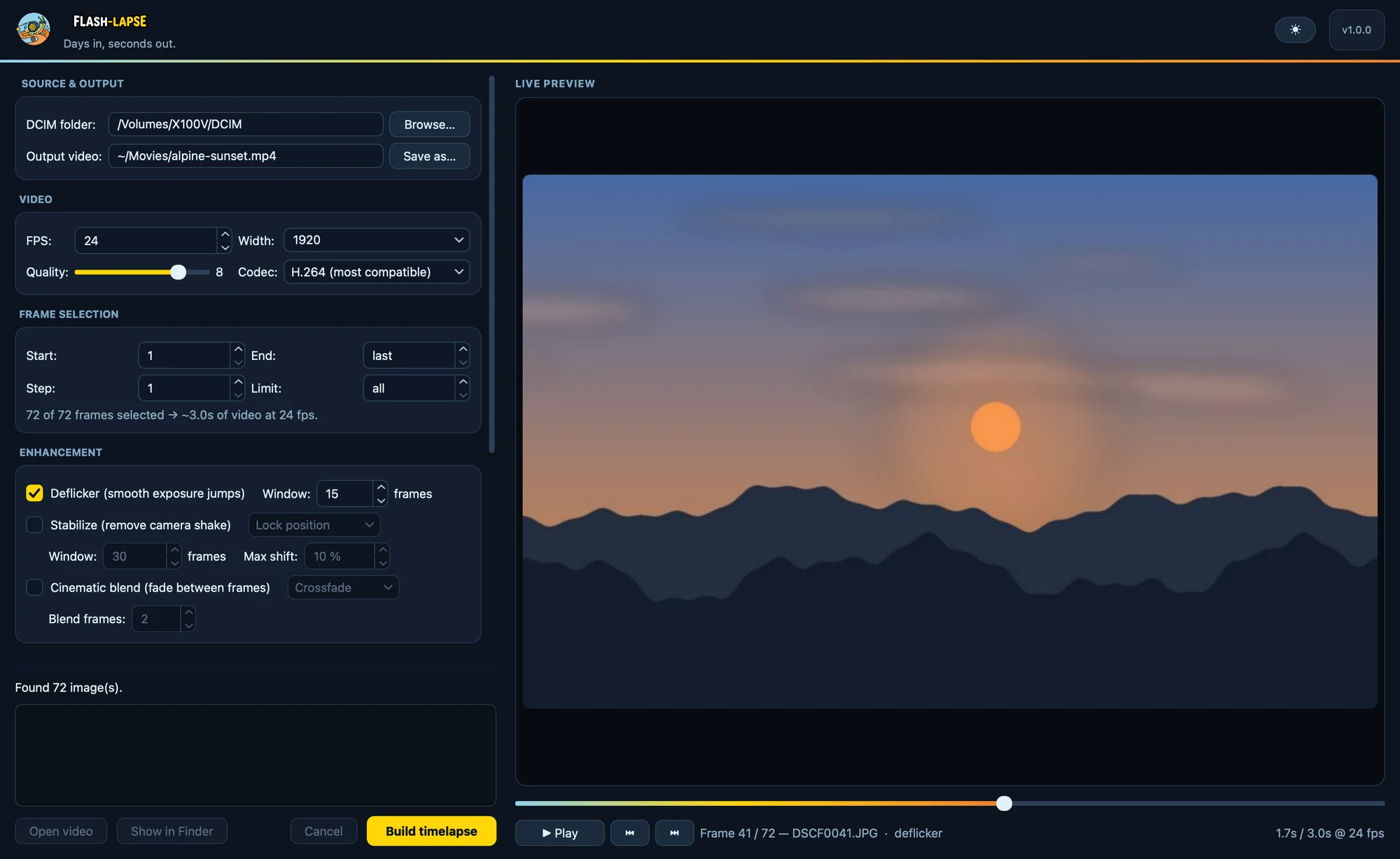
Pick the DCIM folder from your camera. FlashLapse finds every photo across 100MEDIA, 101MEDIA and the rest, sorts them in capture order and plays them as a film straight away. Every setting you change shows up in that preview.

The FlashLapse window: source, video, frame selection and enhancement options on the left, a live preview of a mountain sunset with a gradient scrubber on the right.

Night or day look, your choice. FlashLapse remembers it, along with your folder, settings and window size.

Fix it in the preview, not after the render.

Real cameras flicker, sway and keep shooting through the night. FlashLapse corrects all of it, and every correction is visible in the live preview the moment you switch it on. Try them here.

Flicker, smoothed out

Auto-exposure gives every shot a slightly different brightness, so the finished video pumps. Deflicker measures each frame and pulls it toward a smoothed average of its neighbours.

Frame-to-frame jumps disappear. Slow, real changes like a sunset or passing weather stay. A bigger window smooths harder.

--deflicker --deflicker-window 15

Deflicker off · frame 1
15 frames

A steady picture from a swaying camera

Masts sway in the wind, balconies settle over months, tripods get bumped. FlashLapse measures how far each frame moved and puts it back in place.

All frames get the same slight zoom, just enough to hide the correction, so no black borders appear. Max shift caps how far it may go.

--stabilize --stabilize-mode lock|smooth|anchor
Stabilize off

The raw footage: wind shake plus a slow drift as the mount settles.

Nights, skipped

A camera left outside for weeks records every night too. Skip dark frames drops photos whose average brightness is below a threshold. No GPS or timestamps needed: if it's black, it's out.

Analyze shows how bright your photos are. Night and day form two separate humps, and any threshold between them works. The preview hides dark frames live as you drag.

--skip-dark --dark-threshold 30
30
0 black255 whiteNightsDays

Hiding 1,064 of 2,880 photos, about 37 %. Ten days, one photo every five minutes.

Silky motion between shots

Photos taken minutes apart make clouds and shadows jump. Cinematic blend fades the frames into each other.

Crossfade inserts dissolving in-between frames and raises the frame rate, so the speed stays the same and every photo stays sharp. Motion blur leaves a soft fading trail on anything that moves, like a long exposure.

--blend --blend-mode crossfade --blend-frames 2
Blend off · 24 fps
2

Know the length before you render.

Trim the start and end, keep every Nth photo to speed things up, or cap the count for a quick test. FlashLapse tells you how long the film will be while you type, and the preview always shows exactly that selection.

2,880 is one photo every 30 seconds for a day.
0 means the last photo
2 keeps every second photo
60seconds

1,440 of 2,880 photos selected at 24 fps.

Quick draft

Want to see it for real? Quick draft renders a small MP4 straight from the preview, with every correction applied, in seconds instead of minutes. Check it on your phone, then build the full-quality version.

What happens when you press Build.

  1. Scan

    Finds every photo in capture order. Rotated shots come out upright, broken files are skipped and reported.

  2. Select

    Applies start, end, step and limit, exactly as in the preview.

  3. Filter

    Skips frames below your darkness threshold.

  4. Reduce

    Downscales on every CPU core at once and keeps the result in a cache.

  5. Correct

    Deflicker and stabilization, measured on small copies, so they add seconds, not minutes.

  6. Encode

    Blends and writes H.264 or H.265 with the bundled ffmpeg. Then: Open video.

Quick the first time. Instant the second.

Downscaling thousands of 40-megapixel photos is the slow part of any timelapse. FlashLapse does it once, on every core, and remembers.

All cores, all the time
Photos are decoded and resized in parallel across every core of your Mac or PC.
A cache that pays off
Rebuild at another frame rate, or after adding new photos, and only the new work gets done. Changed photos refresh themselves.
Instant scrubbing
The preview runs on small cached thumbnails, so it stays fluid with thousands of huge files.
H.264 or H.265
H.264 plays everywhere. H.265 makes smaller files and is tagged hvc1, so QuickTime and iPhones play it natively.
Any size, up to full resolution
Pick an output width, or keep the original. Quality goes from 0 to 10. The height follows automatically.
Nothing else to install
ffmpeg, Qt and everything else ship inside the app. Clear caches shows the size and frees the space in one click.

Every option is also a flag.

The same engine runs from the terminal. Good for headless machines, scripts and a nightly job pointed at a webcam folder.

--skip-darkDrop night frames by brightness--deflickerSmooth exposure jumps--stabilizeRemove shake and drift--blendCrossfade or motion blur--diagnose-darknessPrint the brightness report
# 24 fps, 1920 px wide, saved next to the DCIM folder
python timelapse.py /Volumes/CAMERA/DCIM

# Skip the nights, smooth the exposure, steady the shake
python timelapse.py /Volumes/CAMERA/DCIM \
  --skip-dark --deflicker --stabilize

# Construction site: anchor to two rooftops that never change
python timelapse.py /Volumes/CAMERA/DCIM --stabilize \
  --stabilize-mode anchor \
  --stabilize-anchor 70,10,12,8 --stabilize-anchor 5,12,10,8

# Silky clouds: two in-between frames per photo (24 → 72 fps)
python timelapse.py /Volumes/CAMERA/DCIM --blend --blend-frames 2

# Full resolution, smaller file, every 3rd photo
python timelapse.py /Volumes/CAMERA/DCIM \
  --width original --codec h265 --step 3
The FlashLapse snail with a camera-shutter shell

Get FlashLapse. It's free.

No ads, no malware, just free and open to use. A self-contained app for macOS: no Python, no ffmpeg, nothing else to set up.

macOS

Open the .dmg and drag FlashLapse into Applications. Native on Apple silicon.

Download .dmg

First launch: the app isn't signed yet, so right-click it and choose Open once.

WindowsComing soon

The Windows app is on its way: one folder, no installer, no admin rights.